« Previous « Start » Next »
6 Controlling the Global Assembly Cache
TOMNET requires the assemblies in
C:\TOMNET\assembly
to be in the Global Assembly Cache (GAC).
This is taken care of automatically by the
installer if the user running the TOMNET installer is
a local Administrator.
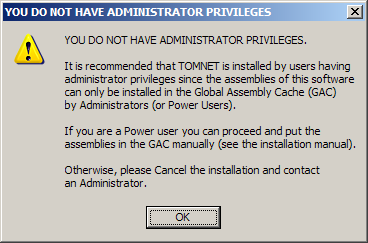
If the installer fails to add the assemblies to the GAC
a warning (see below) is prompted and the user must to
this manually.
NOTE: If no warning is prompted
there is no need to add the assemblies manually.
6.1 Adding assemblies Manually
NOTE: You need to be logged in as a local
administrator or power user to Manually add assemblies.
If the installer prompts a warning (see below)
the installer is unable to add the TOMNET assemblies
to the GAC and the user must add them manually.
To add the assemblies manually the user adding them must
be logged in as a local administrator or a power user.
-
Select Start - Settings - Control Panel.
- Double-click on Administrative Tools.
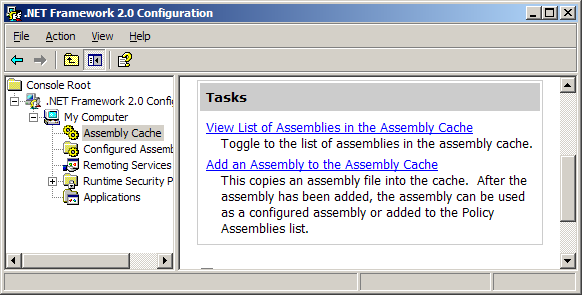
- Double-click on Microsoft .NET Framework 2.0 Configuration.
- Click on Add an Assembly to the Assembly Cache.
- Select all files in the folder C:\TOMNET\assembly).
6.2 Running TOMNET without adding items to the GAC
If the TOMNET assemblies are not stored in the GAC the user
will typically encounter the following exception:
Unhandled Exception: System.IO.FileNotFoundException:
Could not load file or assembly 'TOMNET, Version=1.0.0.0,
Culture=neutral, PublicKeyToken=1f42b31139aa4a50' or one
of its dependencies. The system cannot find the file
specified.
It is possible to use the TOMNET Optimization Platform without
adding the assemblies in the GAC, but it is not recommended
except for temporary usage.
In this case all assemblies required to run TOMNET
(the files in the folder
C:\TOMNET\assembly)
must be copied into the folder an executable file is run in.
« Previous « Start » Next »
 TOMNET